How to Actually Export Your WhatsApp History
I wanted fourteen years of WhatsApp history off an iPhone. Almost everything recommended online does not work on a modern iPhone, and the thing that does work is not on any list.
This is a record of seven routes tried, six of which failed. The one that survived was the obvious one dismissed at the start. If you only want the answer, skip to the end. The failures are the useful part, because each one rules out a category of advice that would otherwise cost a weekend.
The trigger
WhatsApp’s own Export Chat button refused: the chat had Advanced Chat Privacy enabled, which blocks export, and turning it off posts a visible system message in the chat. Even without that, Export Chat caps at 40,000 messages (10,000 with media), one conversation at a time. It was never going to produce a full archive.
Six routes that failed
1. The encrypted iPhone backup. The standard advice is an encrypted Finder backup, decrypted to read WhatsApp’s database out of it. The backup decrypted fine. The database inside was WhatsApp Business, the wrong account, and the personal ChatStorage.sqlite was not in the backup at all. Once end-to-end encrypted backups have ever been enabled, iOS stops including WhatsApp’s chat database in device backups entirely; from then on it lives only in iCloud, encrypted.
2. Turn end-to-end backups off and back up again. A fresh backup with encryption disabled took hours. It brought back the media files and a search index listing more than 400,000 messages back to 2012, but still not the chat database. The index is useless as a transcript: its text is deliberately word-shuffled for indexing. Force-quitting WhatsApp, re-toggling the setting and backing up again gave the same result four times.
3. Paid recovery software. iMazing, Dr.Fone, Tenorshare and iMyFone are each a reader for the same backup that already excludes the data. Forensic tools that bypass the backup (Cellebrite, GrayKey) need a jailbreak the phone does not have. I ran Wondershare MobileTrans far enough to watch its own logs: it took the same lockdown-escrow backup Finder uses and hit the same exclusion.
4. The tool that would have worked. Elcomsoft’s WhatsApp explorer can read the iCloud backup blob, but only by registering itself as a new linked device via an SMS code, which logs the real phone out of WhatsApp until it is re-registered. Windows only, paid, and it de-registers the primary device. Not worth it.
5. Brute-forcing the iCloud blob by hand. I had the encrypted ChatStorage.sqlite.enc from iCloud. A script tried about 5,900 combinations of key derivations, offsets, initialisation vectors and cipher modes, checking each output for a valid database header. All negative. Android’s encrypted backup carries a plaintext header that an open-source tool can parse; the iOS blob is ciphertext from the first byte, which an entropy measurement confirmed. The framing would have to be reverse-engineered out of WhatsApp’s iOS binary, blocked by the same missing jailbreak.
6. Scrolling the desktop app. WhatsApp for Mac pulls older history on demand as you scroll. It works, at about 25 messages a minute. For more than 400,000 messages that is roughly two weeks of continuous scrolling.
The one that worked
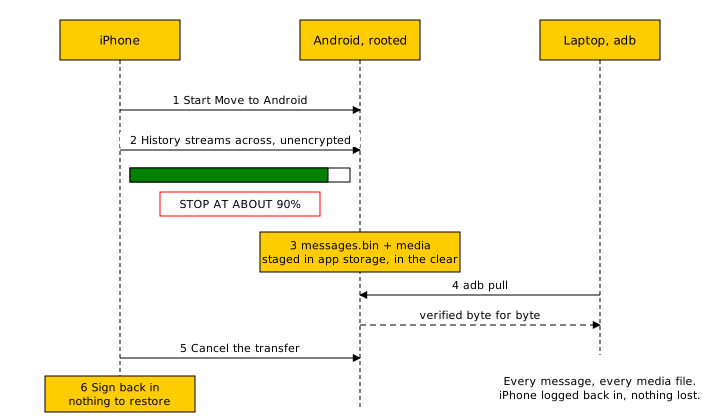
Migrate the account, and intercept the migration. WhatsApp’s official Move to Android feature transfers the entire history phone to phone. That transfer between two of your own registered devices is unencrypted: it stages a single protobuf file, messages.bin, in app storage on the receiving Android phone before importing it. I started the official migration to a borrowed, rooted Android phone and let it run most of the way, around 90 percent. While it was still running I pulled messages.bin and the media files off the Android phone over adb and verified the file byte for byte. Then I cancelled the transfer and logged back in on the iPhone. Nothing had to be restored; the iPhone signed straight back in with everything still there.
That gave me every message and every media file, including the media-only messages the search index had skipped. No decryption, no paid tool, no jailbreak. Moving data to your own new phone is a thing WhatsApp is designed to do in the clear.
Do not start with backups or recovery software. On a modern iPhone that has ever had end-to-end encrypted backups enabled, that entire category is dead on arrival. The route that works is migrating the account to an Android phone, borrowed is fine, and taking WhatsApp’s own unencrypted migration file, messages.bin, off the Android phone before the transfer completes. I got all of my messages and all of my media. Everything else was a more elaborate way of discovering that the data was not where the internet said it would be.